---
title: How to Repair the SOLIDWORKS Installation
description: Running a SOLIDWORKS Repair is sometimes necessary to fix installation-related problems in various SOLIDWORKS-related applications
---
[Skip to content](https://faq.mecad.co.za/knowledge/how-to-repair-the-solidworks-installation#main-content)
English
Show submenu for translations
[More support](https://faq.mecad.co.za/knowledge/kb-tickets/new?hsLang=en)
[](https://mecad.co.za/)
- [About](https://mecad.co.za/about/)
- [Products](https://mecad.co.za/products/)
- [Training](https://mecad.co.za/solidworks-training/)
- Support
Show submenu for Support
- [Request Support](https://mecad.co.za/request-support/)
- [Contact Us](https://mecad.co.za/contact-us/)
- Resources
Show submenu for Resources
- [Promotions](https://mecad.co.za/end-of-promotion/)
- [Product Brochures](https://mecad.co.za/solidworks-product-brochures/)
- [Customer Stories](https://mecad.co.za/solidworks-customer-stories/)
- [Blog](https://mecad.co.za/solidworks-blog/)
- [Webinars](https://www.youtube.com/@mecadsystems-solidworksand4875)
- [Events](https://mecad.co.za/events/)
- [Careers](https://mecad.co.za/careers/)
Open main navigation
Close main navigation
- [About](https://mecad.co.za/about/)
- [Products](https://mecad.co.za/products/)
- [Training](https://mecad.co.za/solidworks-training/)
- Support
Show submenu for Support
- [Request Support](https://mecad.co.za/request-support/)
- [Contact Us](https://mecad.co.za/contact-us/)
- Resources
Show submenu for Resources
- [Promotions](https://mecad.co.za/end-of-promotion/)
- [Product Brochures](https://mecad.co.za/solidworks-product-brochures/)
- [Customer Stories](https://mecad.co.za/solidworks-customer-stories/)
- [Blog](https://mecad.co.za/solidworks-blog/)
- [Webinars](https://www.youtube.com/@mecadsystems-solidworksand4875)
- [Events](https://mecad.co.za/events/)
- [Careers](https://mecad.co.za/careers/)
- English
Show submenu for translations
- [More support](https://faq.mecad.co.za/knowledge/kb-tickets/new)
- [Contact us](https://mecad.co.za/contact-us/)
[Contact us](https://mecad.co.za/contact-us/)
How can we help you?
- There are no suggestions because the search field is empty.
1. [MECAD Systems Knowledge Base](https://faq.mecad.co.za/knowledge?hsLang=en)
2. [General FAQ](https://faq.mecad.co.za/knowledge/general-faq?hsLang=en)
3. [Installation](https://faq.mecad.co.za/knowledge/general-faq?hsLang=en#installation)
# How to Repair the SOLIDWORKS Installation
## How do you repair a SOLIDWORKS installation?
To repair SOLIDWORKS, open **Add or Remove Programs**, locate your SOLIDWORKS version, select **Modify**, then choose **Repair your installation** in the SOLIDWORKS Installation Manager. Running a SOLIDWORKS Repair fixes installation-related problems in SOLIDWORKS 3D CAD, SOLIDWORKS Visualize, eDrawings, and other SOLIDWORKS-related applications.
## What do you need to do before performing a SOLIDWORKS Repair?
- The installation files are required to run a SOLIDWORKS Repair, and the file location must be the same one used during the original installation. Ensure the files are accessible based on your installation source:
- **DVD or USB:** Insert the DVD or USB into the PC and confirm the files are accessible.
- **Network location:** Connect to the same network and confirm access to the network file location.
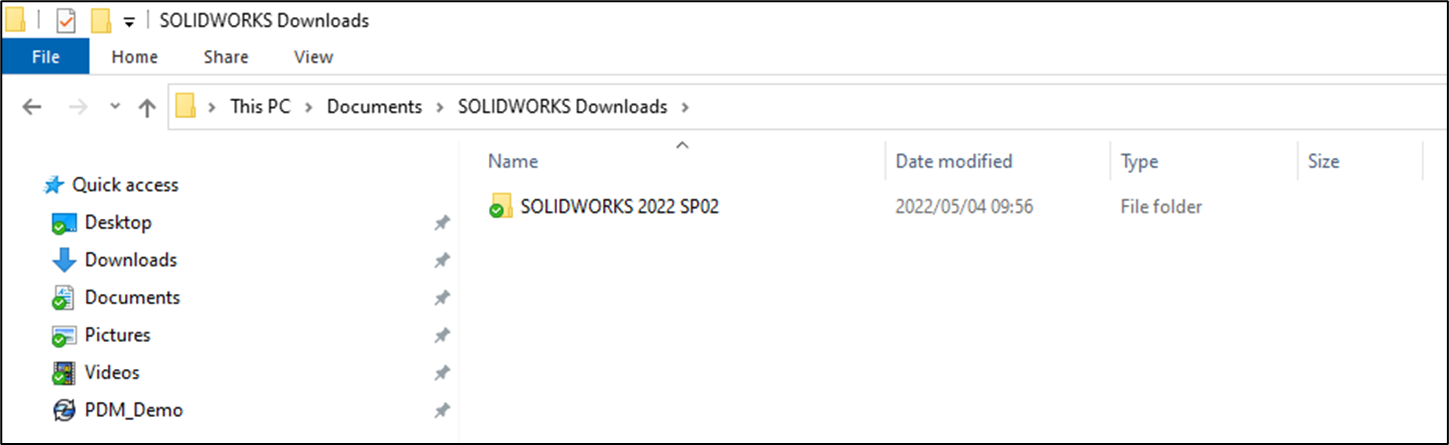
- **Local drive:** Confirm the installation files are accessible on the drive. The default installation file location may vary by SOLIDWORKS version — check your SOLIDWORKS Installation Manager or release notes for the correct path. A common default is `C:\Users\username\Documents\SOLIDWORKS Downloads`.
- Disable Antivirus software temporarily.
- Disable User Account Controls (UAC) by sliding the slider bar to **Never Notify.**
## How do you repair SOLIDWORKS and SOLIDWORKS-related products?
1. Close the SOLIDWORKS application, if the application is running.
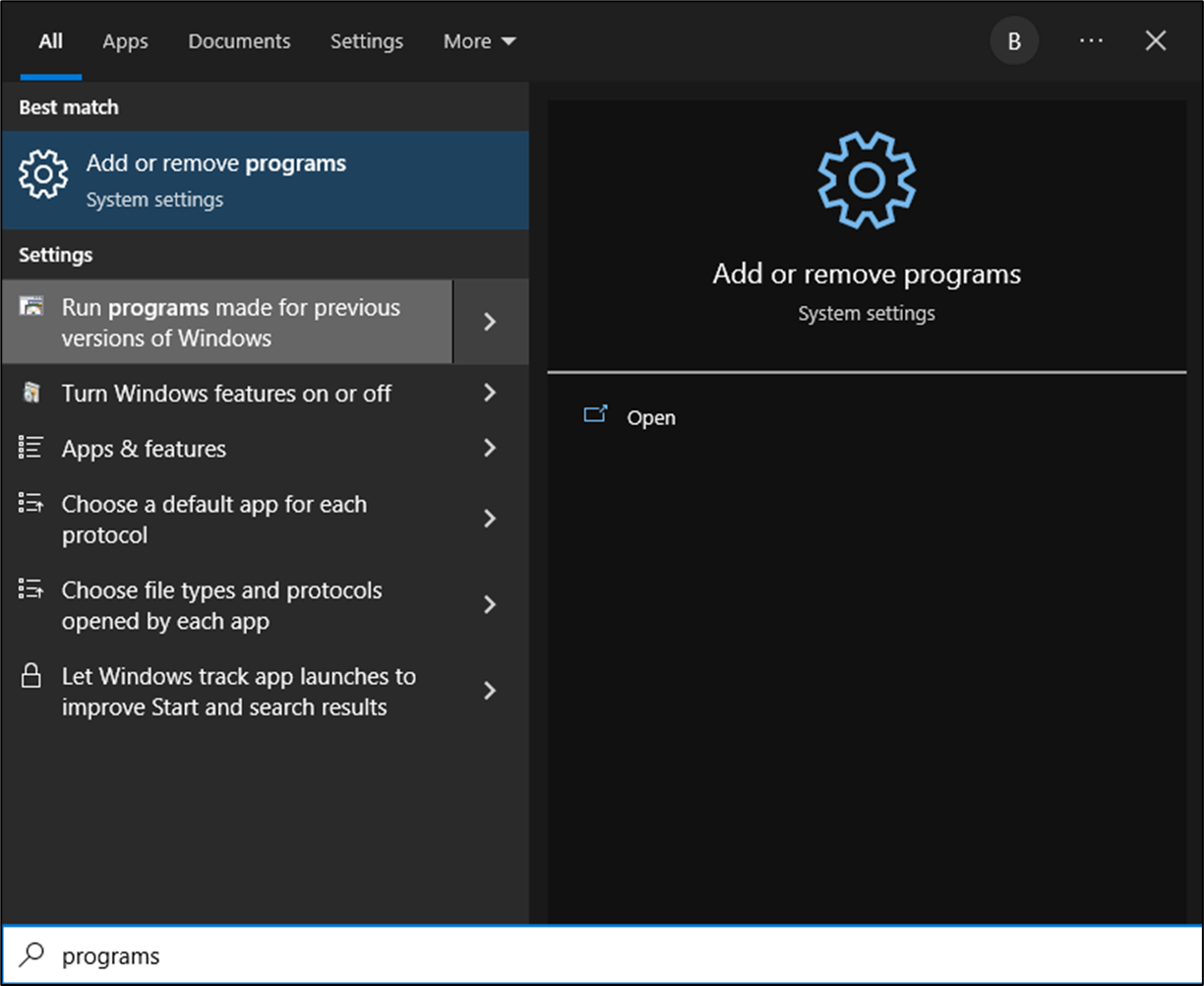
2. Click **Start**, type ‘programs’ in the search field, and select **Add or Remove Programs.**
****
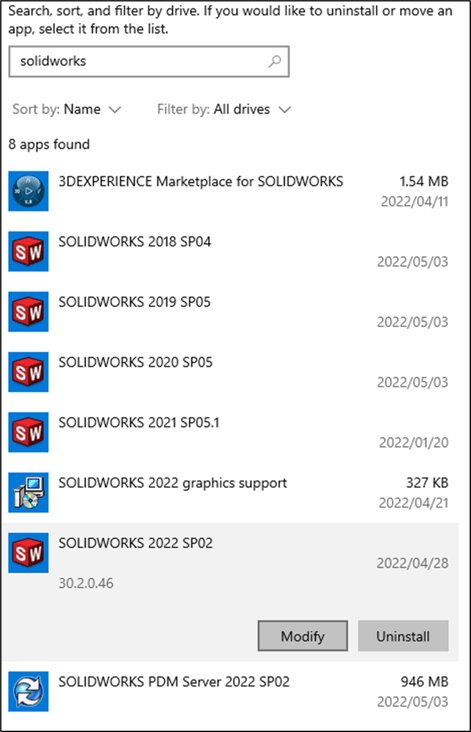
3. Under Apps & features, browse to the correct SOLIDWORKS version and select **Modify**.
Please note that if the Modify option is not available, SOLIDWORKS was installed using an Administrative Image. The Administrative Image will have to be uninstalled and reinstalled to resolve any installation-related problems.
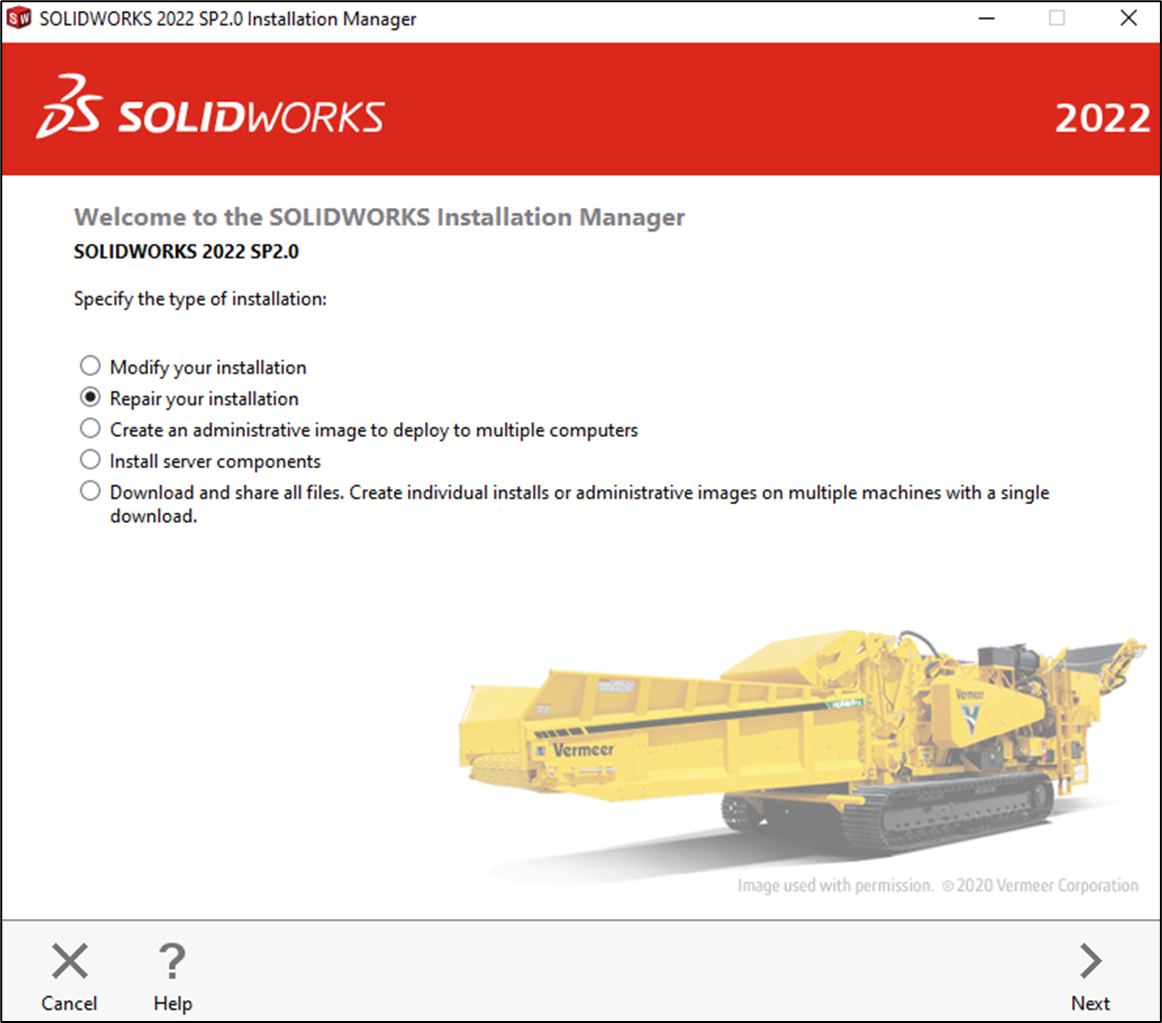
4. In the SOLIDWORKS Installation Manager, select **Repair your Installation** and select **Next**.
5. Select the products you wish to repair and select **Repair**.
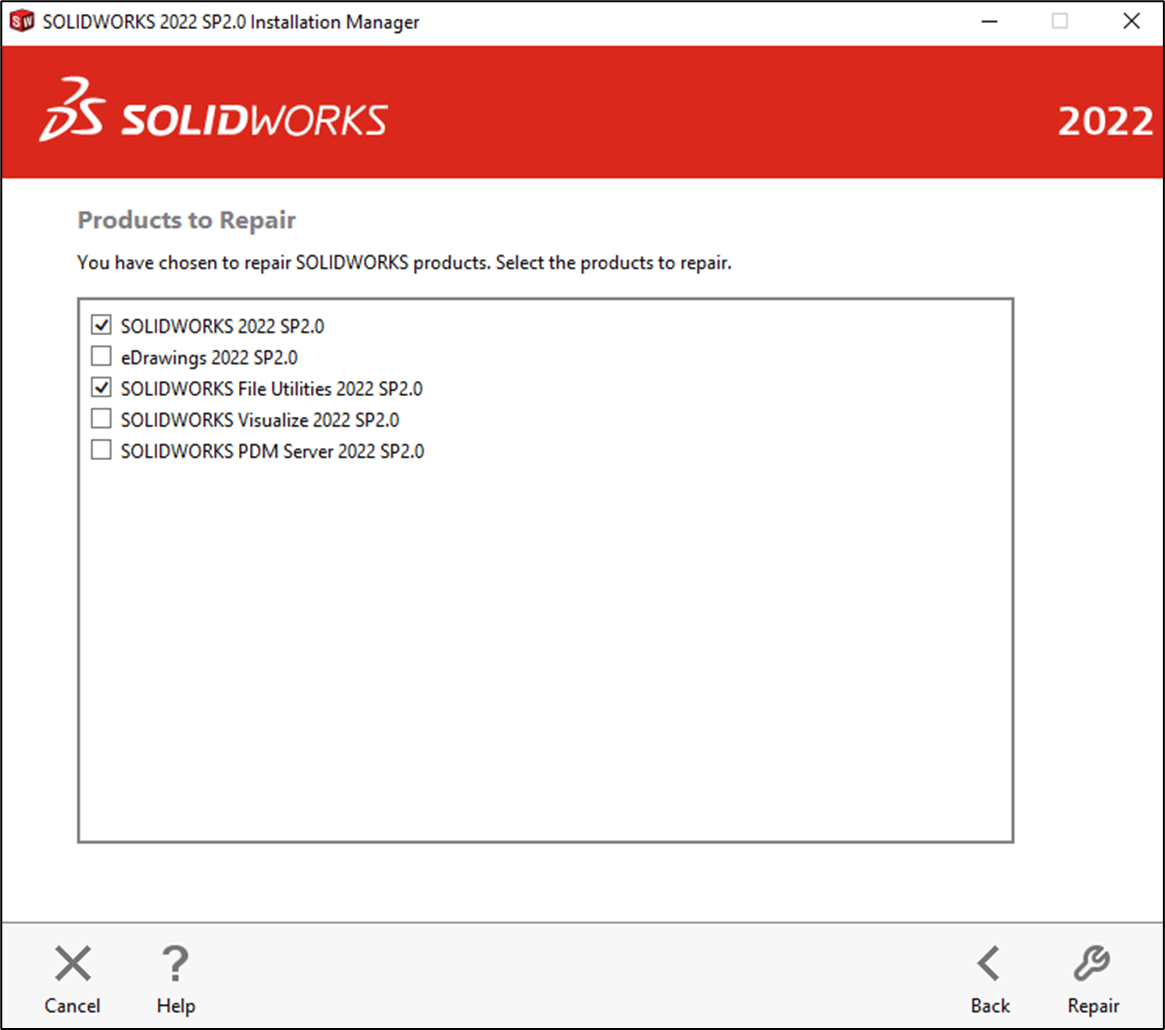
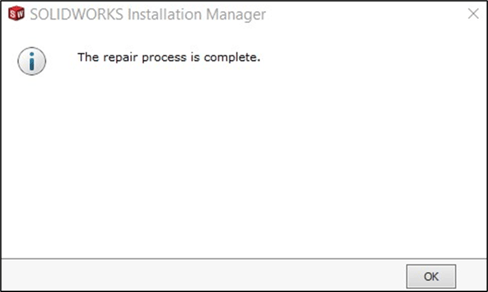
The installation manager will then proceed to repair the selected products and when complete, a confirmation dialog box will appear stating that the repair process is complete.
Please note: Please do remember to re-enable Antivirus software and to restore User Account Controls settings.
Should the repair not resolve your product’s problems, please contact Mecad Support at **[support@mecad.co.za](mailto:support@mecad.co.za)** for assistance.
- [SOLIDWORKS PDM](https://faq.mecad.co.za/knowledge/solidworks-pdm?hsLang=en)
- [SOLIDWORKS CAM](https://faq.mecad.co.za/knowledge/solidworks-cam?hsLang=en)
- [SOLIDWORKS Visualize](https://faq.mecad.co.za/knowledge/solidworks-visualize?hsLang=en)
- [SOLIDWORKS Simulation](https://faq.mecad.co.za/knowledge/solidworks-simulation?hsLang=en#main-content)
- [SOLIDWORKS Flow Simulation](https://faq.mecad.co.za/knowledge/solidworks-simulation?hsLang=en#solidworks-flow-simulation)
- [SOLIDWORKS Simulation](https://faq.mecad.co.za/knowledge/solidworks-simulation?hsLang=en#solidworks-simulation)
- [SOLIDWORKS Electrical](https://faq.mecad.co.za/knowledge/solidworks-electrical?hsLang=en)
- [SOLIDWORKS Inspection](https://faq.mecad.co.za/knowledge/solidworks-inspection?hsLang=en)
- [General FAQ](https://faq.mecad.co.za/knowledge/general-faq?hsLang=en#main-content)
- [BOM](https://faq.mecad.co.za/knowledge/general-faq?hsLang=en#bom)
- [Sheet Metal](https://faq.mecad.co.za/knowledge/general-faq?hsLang=en#sheet-metal)
- [Files](https://faq.mecad.co.za/knowledge/general-faq?hsLang=en#files)
- [PDM](https://faq.mecad.co.za/knowledge/general-faq?hsLang=en#pdm)
- [Weldments](https://faq.mecad.co.za/knowledge/general-faq?hsLang=en#weldments)
- [Assembly](https://faq.mecad.co.za/knowledge/general-faq?hsLang=en#assembly)
- [Installation](https://faq.mecad.co.za/knowledge/general-faq?hsLang=en#installation)
- [SolidWorks Standalone License](https://faq.mecad.co.za/knowledge/general-faq?hsLang=en#solidworks-standalone-license)
- [File Locations](https://faq.mecad.co.za/knowledge/general-faq?hsLang=en#file-locations)
- [Certifications](https://faq.mecad.co.za/knowledge/general-faq?hsLang=en#certifications)
- [3DEXPERIENCE Platform](https://faq.mecad.co.za/knowledge/3dexperience-platform?hsLang=en#main-content)
- [FAQ](https://faq.mecad.co.za/knowledge/3dexperience-platform?hsLang=en#faq)
- [Updates](https://faq.mecad.co.za/knowledge/3dexperience-platform?hsLang=en#updates)
- [SOLIDWORKS 3D CAD](https://faq.mecad.co.za/knowledge/solidworks-3d-cad?hsLang=en#main-content)
- [Activation](https://faq.mecad.co.za/knowledge/solidworks-3d-cad?hsLang=en#activation)
- [Tips & Tricks](https://faq.mecad.co.za/knowledge/solidworks-3d-cad?hsLang=en#tips-tricks)
- [Installation](https://faq.mecad.co.za/knowledge/solidworks-3d-cad?hsLang=en#installation)
- [Custom](https://faq.mecad.co.za/knowledge/solidworks-3d-cad?hsLang=en#custom)
- [Configurations](https://faq.mecad.co.za/knowledge/solidworks-3d-cad?hsLang=en#configurations)
- [Drawings](https://faq.mecad.co.za/knowledge/solidworks-3d-cad?hsLang=en#drawings)
- [PDM](https://faq.mecad.co.za/knowledge/solidworks-3d-cad?hsLang=en#pdm)
- [Assemblies](https://faq.mecad.co.za/knowledge/solidworks-3d-cad?hsLang=en#assemblies)
- [SOLIDWORKS Gold Products](https://faq.mecad.co.za/knowledge/solidworks-gold-products?hsLang=en#main-content)
- [myCADtools](https://faq.mecad.co.za/knowledge/solidworks-gold-products?hsLang=en#mycadtools)
- [Licensing FAQ](https://faq.mecad.co.za/knowledge/licensing-faq?hsLang=en#main-content)
- [July 2023 SOLIDWORKS License & Subscription Changes](https://faq.mecad.co.za/knowledge/licensing-faq?hsLang=en#july-2023-solidworks-license-subscription-changes)
- [DraftSight](https://faq.mecad.co.za/knowledge/draftsight?hsLang=en)
- [MECAD Events](https://faq.mecad.co.za/knowledge/mecad-events?hsLang=en#main-content)
- [MECAD Accelerate](https://faq.mecad.co.za/knowledge/mecad-events?hsLang=en#mecad-accelerate)
- [About](https://mecad.co.za/about/)
- [Products](https://mecad.co.za/products/)
- [Training](https://mecad.co.za/solidworks-training/)
- [Support](https://mecad.co.za/request-support/)
- [Request a quote](https://mecad.co.za/request-a-quote/)
[](https://mecad.co.za/)
**Centurion Offices**
Rosehip Office Park, 29 Landmarks Ave, Kosmosdal Ext 11, Samrand Centurion Gauteng
+27 12 645 4300
**Cape Town Offices**
Unit E1, Centurion Business Park, Cnr Bosmansdam & Democracy Road, Milnerton Cape Town, Western Cape
+27 21 555 1513
**Durban Offices**
Fairway Green Office Park, Gardenia House, 3 Abrey Road, Kloof Durban KwaZulu-Natal
+27 31 764 7658
[mailto:email@email.com](mailto:email@email.com)
Copyright © 2025, MECAD