---
title: How to Access Free SOLIDWORKS Exams
description: This article describes how SOLIDWORKS Customers on active subscription can redeem their certification vouchers to access free exams.
---
[Skip to content](https://faq.mecad.co.za/knowledge/how-to-redeem-free-solidworks-certifications#main-content)
English
Show submenu for translations
[More support](https://faq.mecad.co.za/knowledge/kb-tickets/new?hsLang=en)
[](https://mecad.co.za/)
- [About](https://mecad.co.za/about/)
- [Products](https://mecad.co.za/products/)
- [Training](https://mecad.co.za/solidworks-training/)
- Support
Show submenu for Support
- [Request Support](https://mecad.co.za/request-support/)
- [Contact Us](https://mecad.co.za/contact-us/)
- Resources
Show submenu for Resources
- [Promotions](https://mecad.co.za/end-of-promotion/)
- [Product Brochures](https://mecad.co.za/solidworks-product-brochures/)
- [Customer Stories](https://mecad.co.za/solidworks-customer-stories/)
- [Blog](https://mecad.co.za/solidworks-blog/)
- [Webinars](https://www.youtube.com/@mecadsystems-solidworksand4875)
- [Events](https://mecad.co.za/events/)
- [Careers](https://mecad.co.za/careers/)
Open main navigation
Close main navigation
- [About](https://mecad.co.za/about/)
- [Products](https://mecad.co.za/products/)
- [Training](https://mecad.co.za/solidworks-training/)
- Support
Show submenu for Support
- [Request Support](https://mecad.co.za/request-support/)
- [Contact Us](https://mecad.co.za/contact-us/)
- Resources
Show submenu for Resources
- [Promotions](https://mecad.co.za/end-of-promotion/)
- [Product Brochures](https://mecad.co.za/solidworks-product-brochures/)
- [Customer Stories](https://mecad.co.za/solidworks-customer-stories/)
- [Blog](https://mecad.co.za/solidworks-blog/)
- [Webinars](https://www.youtube.com/@mecadsystems-solidworksand4875)
- [Events](https://mecad.co.za/events/)
- [Careers](https://mecad.co.za/careers/)
- English
Show submenu for translations
- [More support](https://faq.mecad.co.za/knowledge/kb-tickets/new)
- [Contact us](https://mecad.co.za/contact-us/)
[Contact us](https://mecad.co.za/contact-us/)
How can we help you?
- There are no suggestions because the search field is empty.
1. [MECAD Systems Knowledge Base](https://faq.mecad.co.za/knowledge?hsLang=en)
2. [General FAQ](https://faq.mecad.co.za/knowledge/general-faq?hsLang=en)
3. [Certifications](https://faq.mecad.co.za/knowledge/general-faq?hsLang=en#certifications)
# How to Access Free SOLIDWORKS Exams
## This article describes how SOLIDWORKS Customers on active subscription can redeem their certification vouchers.
## How to Redeem Free SOLIDWORKS Certification Exams with an Active Subscription
Customers with an active SOLIDWORKS subscription receive 6 free certification exam vouchers per year — one from each of the categories below, available in each half of the year (1 January–30 June and 1 July–31 December):
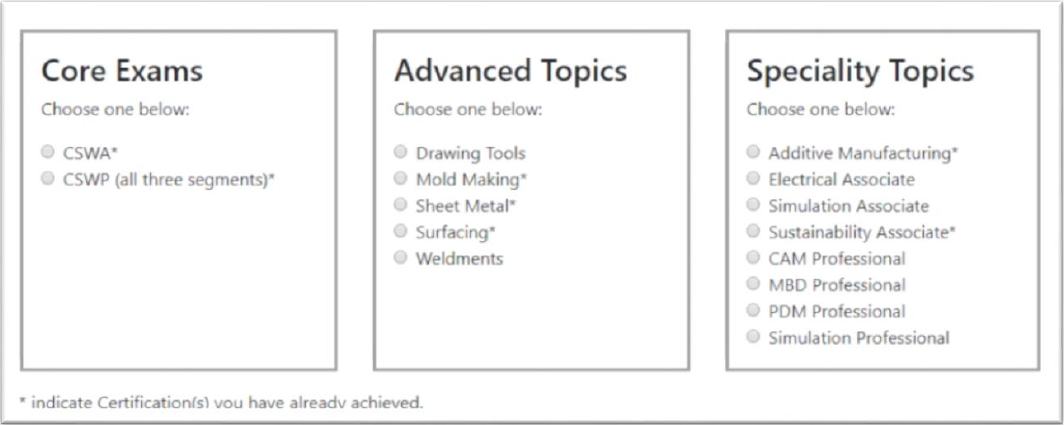
To redeem these certifications, the following prerequisites need to be met:
- The company must have at least one product on active subscription.
- The user/contact must be added under the company as a [contact in DSXClient](https://faq.mecad.co.za/knowledge/what-happened-to-my-customer-portal-and-admin-portal?hsLang=en).
- Have a valid 3DEXPERIENCE Login ID (log in [here](https://eu1.iam.3dexperience.3ds.com/cas/login?saml=false&service=https%3A%2F%2Fmy.solidworks.com%2Fpartner%2Fsaml%2Fpassport.phtml)to check, or create one [here](https://eu1.iam.3dexperience.3ds.com/cas/login?saml=false&service=https%3A%2F%2Fmy.solidworks.com%2Fpartner%2Fsaml%2Fpassport.phtml#register))
Once all three prerequisites above are met, follow these steps to redeem your certification:
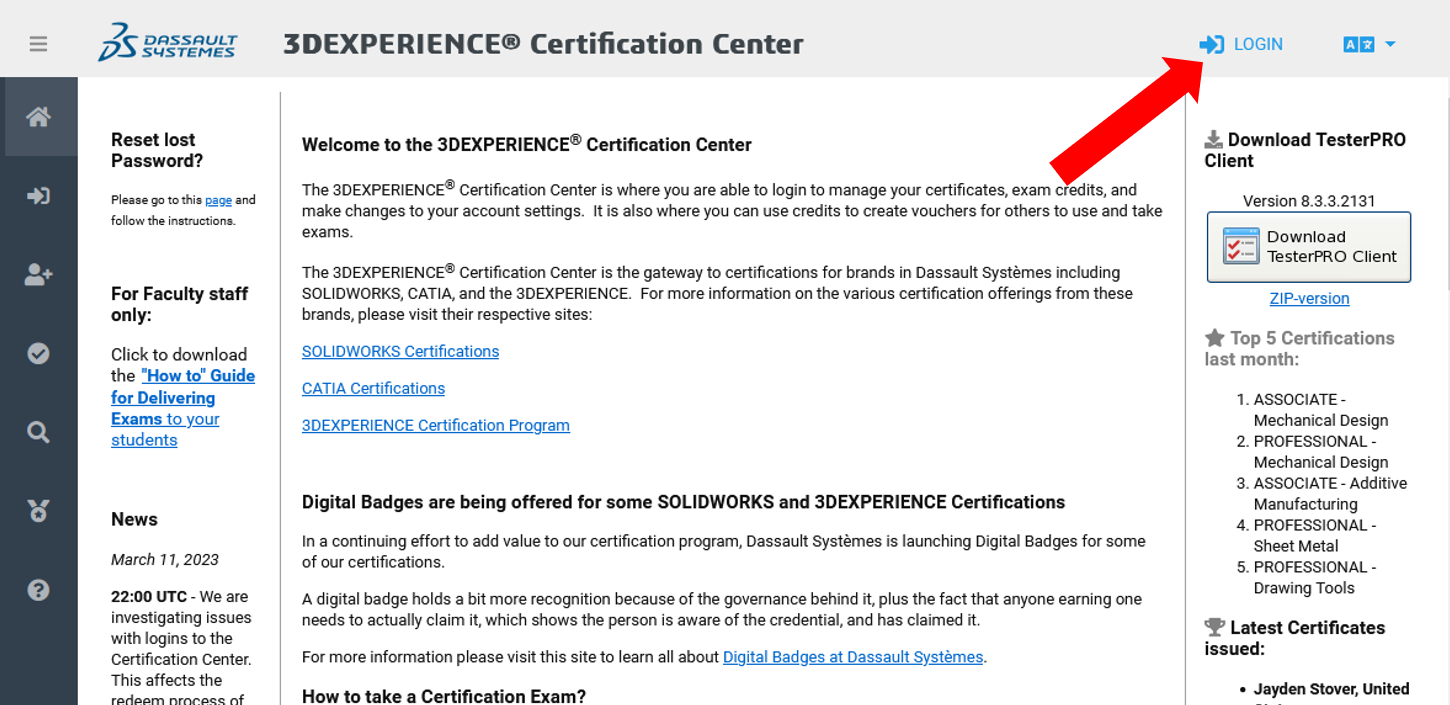
1. Visit [https://3dexperience.virtualtester.com](https://3dexperience.virtualtester.com/)
2. Log in to your 3DEXPERIENCE certification account — or create a new account — using the login button in the upper-right corner of the page.
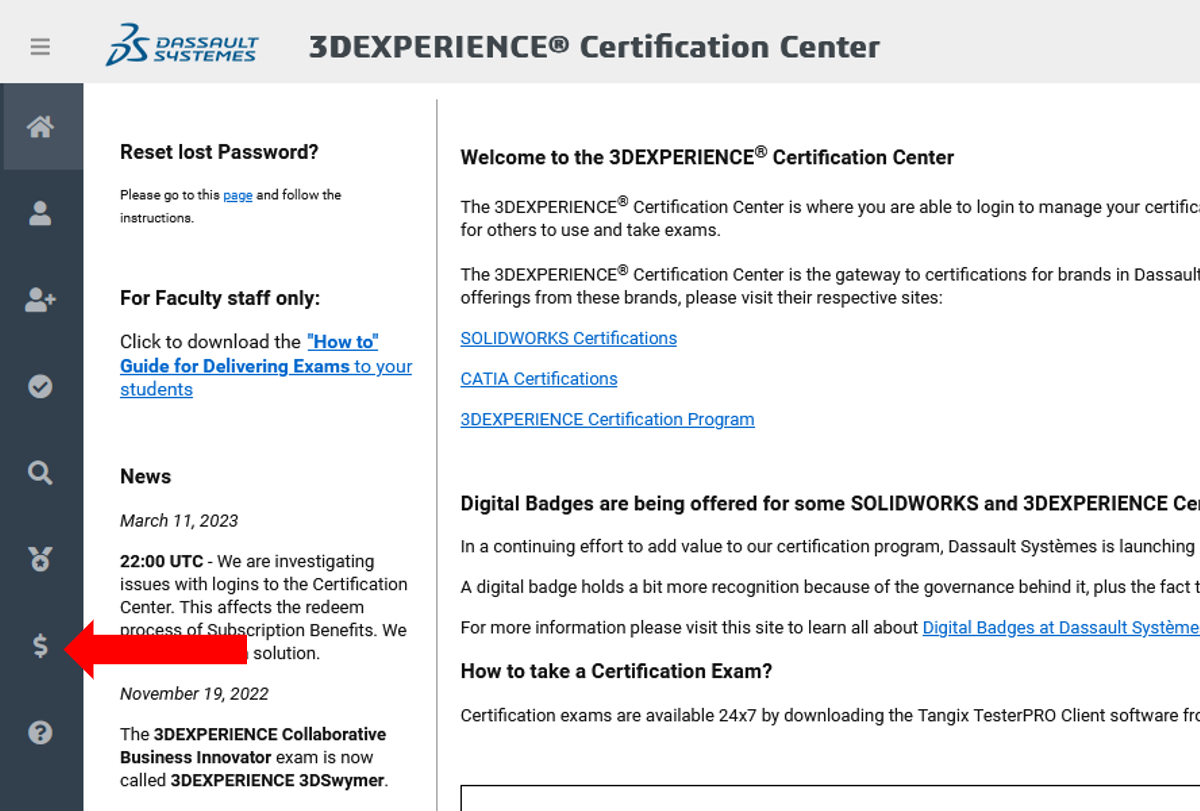
3. Click on the redemption tab ($) along the left-hand navigation pane.
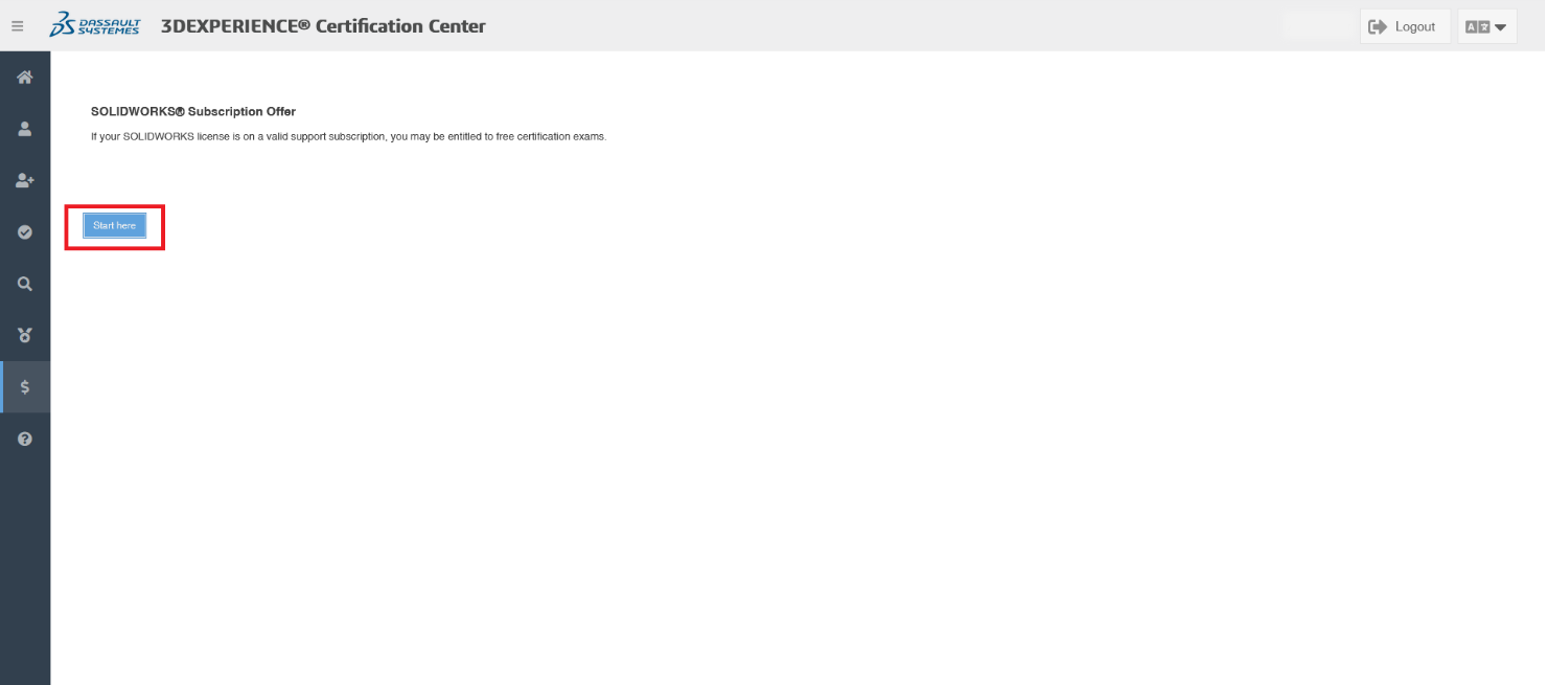
4. Click the *Start here* button.
5. Login here with your 3DEXPERIENCE ID.
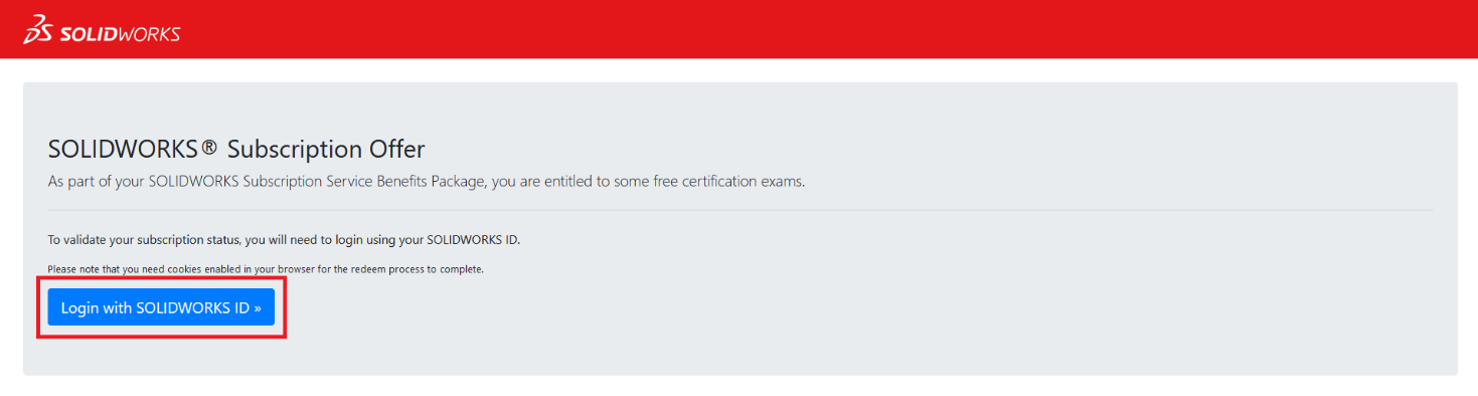
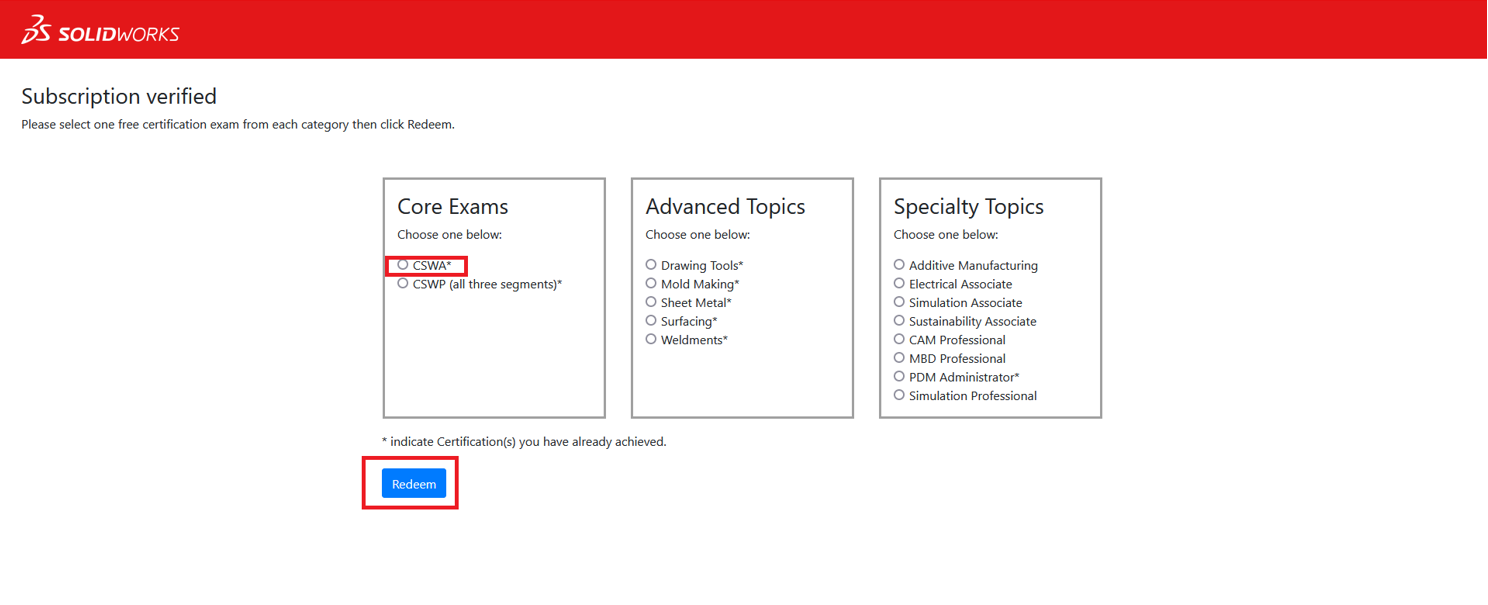
6. Choose the relevant certification from the list and select *Redeem*.
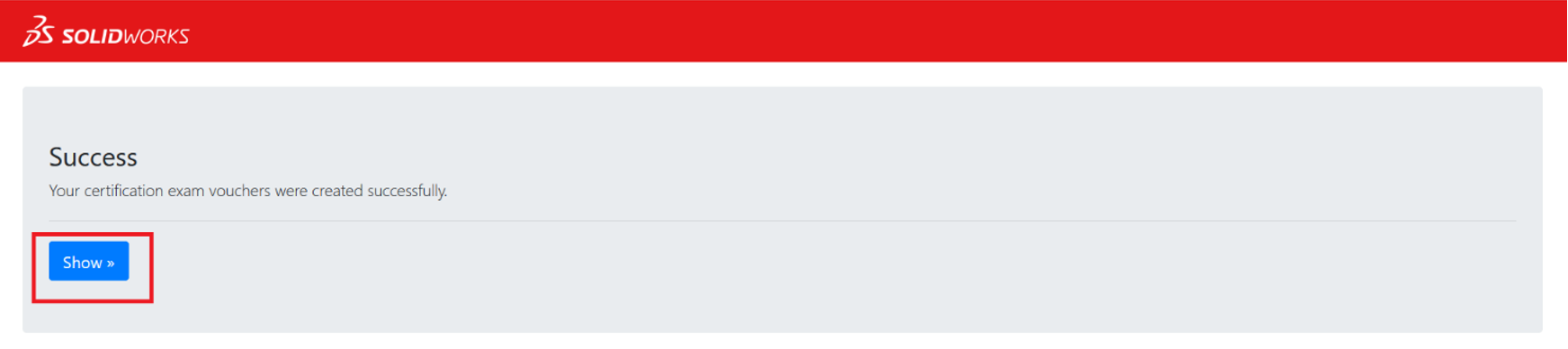
7. If the redemption is successful, you will see the screen below. By clicking on the *Show* button, you will be shown the voucher code required to unlock the certification exam at no cost. Copy and save this code, as it will be needed in the Tangix TesterPRO Client.
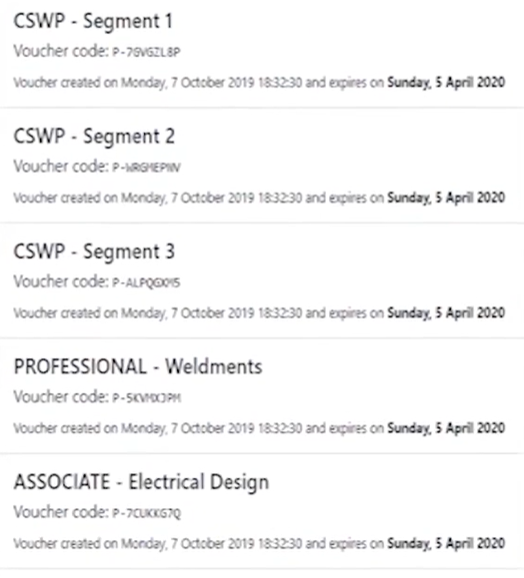
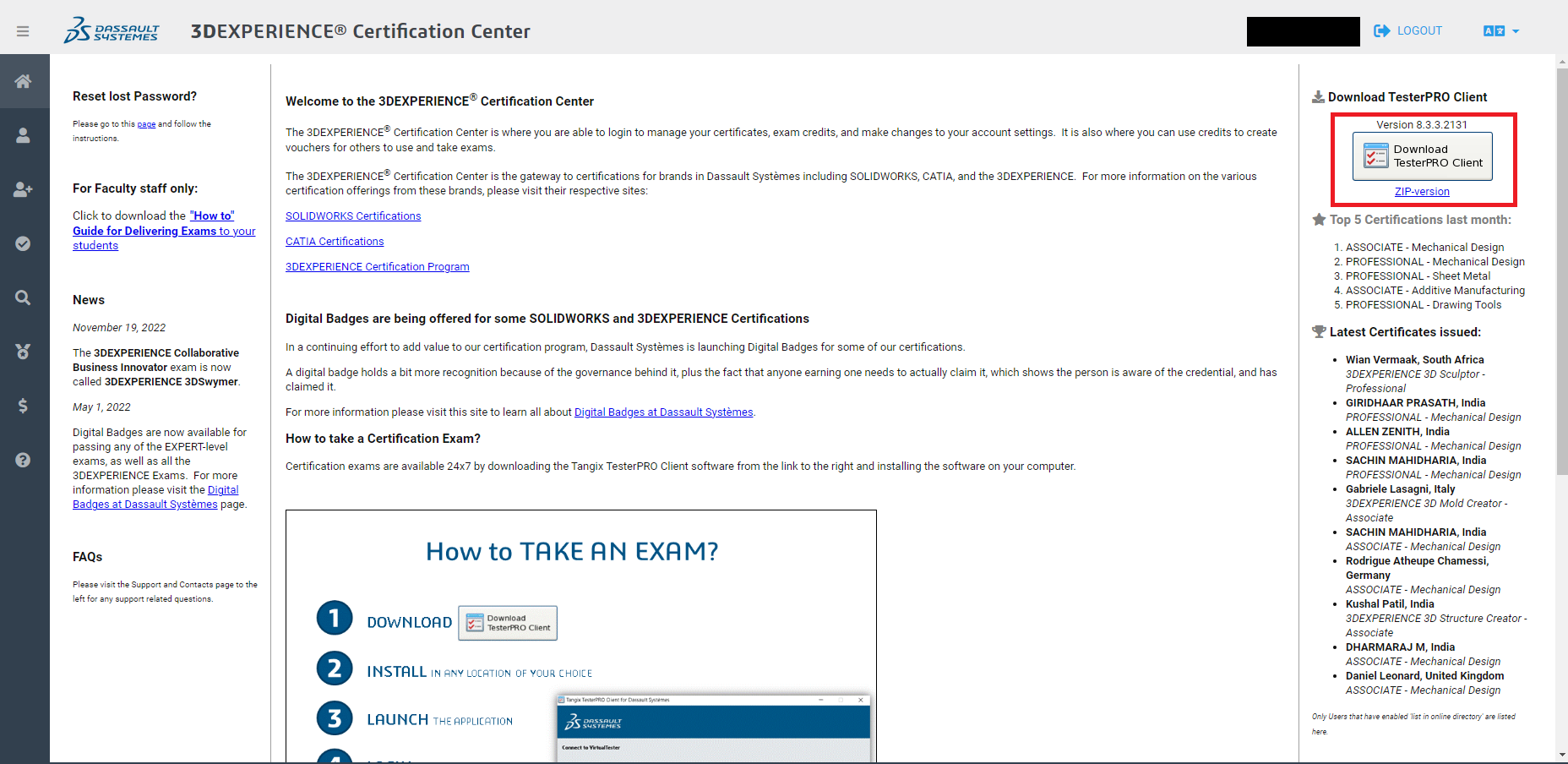
8. Once the voucher has been created, navigate back to the *[3DEXPERIENCE Certification Center](https://3dexperience.virtualtester.com/),* and download the Tangix TesterPRO Client by clicking on the icon on the top-right corner of the page, as shown below, and install the app:
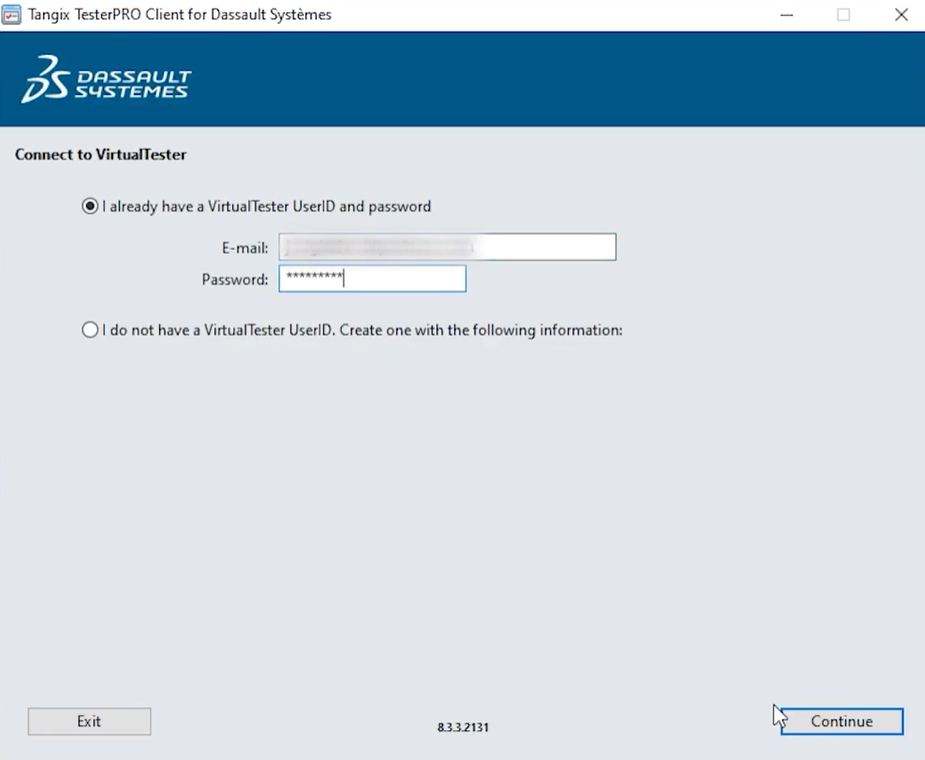
9. After the Tangix TestPRO Client has been installed, log in with your Virtual Tester account, as shown below:
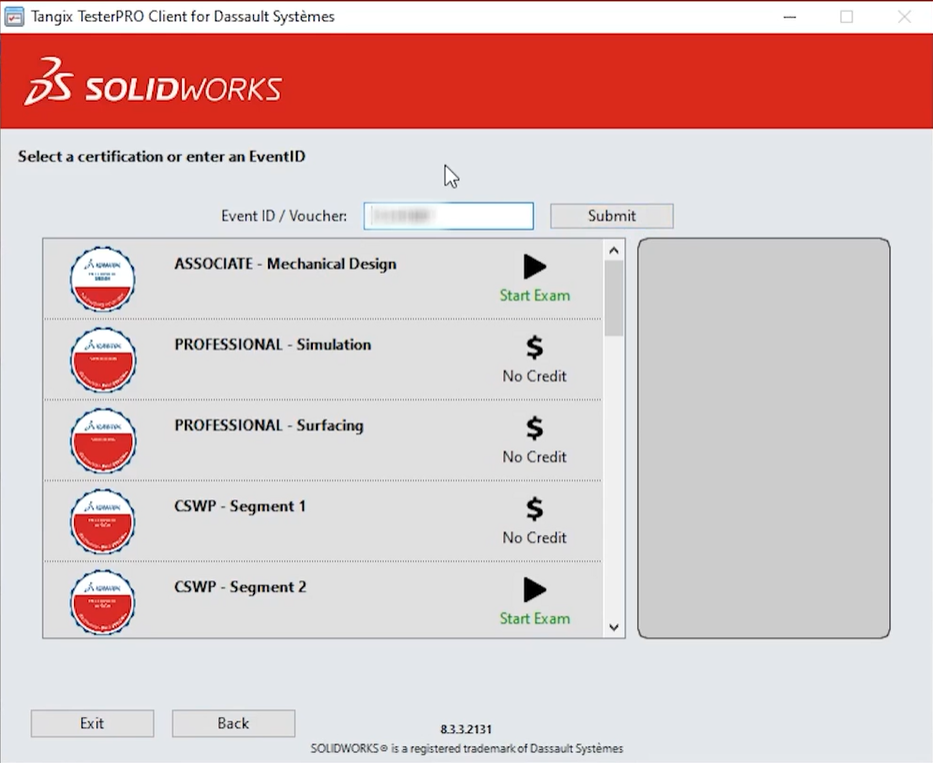
10. Once logged in, in the *Event ID / Voucher* field, copy and paste the voucher code of the exam you wish to write and click *Submit*
**Important:** Clicking *Submit* immediately starts the exam. Do not submit the voucher code until you are fully prepared to begin.
For more information about SOLIDWORKS Certification, please access the Learning Path on MySolidWorks.com called *[Certified SOLIDWORKS Exams](https://my.solidworks.com/training/path/12).* learning path on MySolidWorks.com, which covers everything you need to get started with SOLIDWORKS certification.
If you are having trouble with the above process, please [contact our support team](mailto:support@mecad.co.za) or reach out to [certifications@solidworks.com,](mailto:certification@solidworks.com) and we will gladly assist, thank you.
*⚠️ Last reviewed: 20 March 2023 — This article is over two years old. Screenshots and portal navigation steps may no longer reflect the current 3DEXPERIENCE Certification Center interface. Please verify all steps before following this guide.*
- [SOLIDWORKS PDM](https://faq.mecad.co.za/knowledge/solidworks-pdm?hsLang=en)
- [SOLIDWORKS CAM](https://faq.mecad.co.za/knowledge/solidworks-cam?hsLang=en)
- [SOLIDWORKS Visualize](https://faq.mecad.co.za/knowledge/solidworks-visualize?hsLang=en)
- [SOLIDWORKS Simulation](https://faq.mecad.co.za/knowledge/solidworks-simulation?hsLang=en#main-content)
- [SOLIDWORKS Flow Simulation](https://faq.mecad.co.za/knowledge/solidworks-simulation?hsLang=en#solidworks-flow-simulation)
- [SOLIDWORKS Simulation](https://faq.mecad.co.za/knowledge/solidworks-simulation?hsLang=en#solidworks-simulation)
- [SOLIDWORKS Electrical](https://faq.mecad.co.za/knowledge/solidworks-electrical?hsLang=en)
- [SOLIDWORKS Inspection](https://faq.mecad.co.za/knowledge/solidworks-inspection?hsLang=en)
- [General FAQ](https://faq.mecad.co.za/knowledge/general-faq?hsLang=en#main-content)
- [BOM](https://faq.mecad.co.za/knowledge/general-faq?hsLang=en#bom)
- [Sheet Metal](https://faq.mecad.co.za/knowledge/general-faq?hsLang=en#sheet-metal)
- [Files](https://faq.mecad.co.za/knowledge/general-faq?hsLang=en#files)
- [PDM](https://faq.mecad.co.za/knowledge/general-faq?hsLang=en#pdm)
- [Weldments](https://faq.mecad.co.za/knowledge/general-faq?hsLang=en#weldments)
- [Assembly](https://faq.mecad.co.za/knowledge/general-faq?hsLang=en#assembly)
- [Installation](https://faq.mecad.co.za/knowledge/general-faq?hsLang=en#installation)
- [SolidWorks Standalone License](https://faq.mecad.co.za/knowledge/general-faq?hsLang=en#solidworks-standalone-license)
- [File Locations](https://faq.mecad.co.za/knowledge/general-faq?hsLang=en#file-locations)
- [Certifications](https://faq.mecad.co.za/knowledge/general-faq?hsLang=en#certifications)
- [3DEXPERIENCE Platform](https://faq.mecad.co.za/knowledge/3dexperience-platform?hsLang=en#main-content)
- [FAQ](https://faq.mecad.co.za/knowledge/3dexperience-platform?hsLang=en#faq)
- [Updates](https://faq.mecad.co.za/knowledge/3dexperience-platform?hsLang=en#updates)
- [SOLIDWORKS 3D CAD](https://faq.mecad.co.za/knowledge/solidworks-3d-cad?hsLang=en#main-content)
- [Activation](https://faq.mecad.co.za/knowledge/solidworks-3d-cad?hsLang=en#activation)
- [Tips & Tricks](https://faq.mecad.co.za/knowledge/solidworks-3d-cad?hsLang=en#tips-tricks)
- [Installation](https://faq.mecad.co.za/knowledge/solidworks-3d-cad?hsLang=en#installation)
- [Custom](https://faq.mecad.co.za/knowledge/solidworks-3d-cad?hsLang=en#custom)
- [Configurations](https://faq.mecad.co.za/knowledge/solidworks-3d-cad?hsLang=en#configurations)
- [Drawings](https://faq.mecad.co.za/knowledge/solidworks-3d-cad?hsLang=en#drawings)
- [PDM](https://faq.mecad.co.za/knowledge/solidworks-3d-cad?hsLang=en#pdm)
- [Assemblies](https://faq.mecad.co.za/knowledge/solidworks-3d-cad?hsLang=en#assemblies)
- [SOLIDWORKS Gold Products](https://faq.mecad.co.za/knowledge/solidworks-gold-products?hsLang=en#main-content)
- [myCADtools](https://faq.mecad.co.za/knowledge/solidworks-gold-products?hsLang=en#mycadtools)
- [Licensing FAQ](https://faq.mecad.co.za/knowledge/licensing-faq?hsLang=en#main-content)
- [July 2023 SOLIDWORKS License & Subscription Changes](https://faq.mecad.co.za/knowledge/licensing-faq?hsLang=en#july-2023-solidworks-license-subscription-changes)
- [DraftSight](https://faq.mecad.co.za/knowledge/draftsight?hsLang=en)
- [MECAD Events](https://faq.mecad.co.za/knowledge/mecad-events?hsLang=en#main-content)
- [MECAD Accelerate](https://faq.mecad.co.za/knowledge/mecad-events?hsLang=en#mecad-accelerate)
- [About](https://mecad.co.za/about/)
- [Products](https://mecad.co.za/products/)
- [Training](https://mecad.co.za/solidworks-training/)
- [Support](https://mecad.co.za/request-support/)
- [Request a quote](https://mecad.co.za/request-a-quote/)
[](https://mecad.co.za/)
**Centurion Offices**
Rosehip Office Park, 29 Landmarks Ave, Kosmosdal Ext 11, Samrand Centurion Gauteng
+27 12 645 4300
**Cape Town Offices**
Unit E1, Centurion Business Park, Cnr Bosmansdam & Democracy Road, Milnerton Cape Town, Western Cape
+27 21 555 1513
**Durban Offices**
Fairway Green Office Park, Gardenia House, 3 Abrey Road, Kloof Durban KwaZulu-Natal
+27 31 764 7658
[mailto:email@email.com](mailto:email@email.com)
Copyright © 2025, MECAD